Code
import numpy as np
import matplotlib.pyplot as plt
import pandas as pd
import seaborn as sns
from IPython.display import Image, HTML
import warnings
warnings.filterwarnings('ignore')

%matplotlib inline
import numpy as np
import matplotlib.pyplot as plt
import pandas as pd
import seaborn as sns
from IPython.display import Image, HTML
import warnings
warnings.filterwarnings('ignore')
%matplotlib inlineIn this lecture, we’ll build an understanding of neural networks, starting from the foundations and moving to practical implementation using scikit-learn.
We’ll cover:
MLPClassifier and MLPRegressor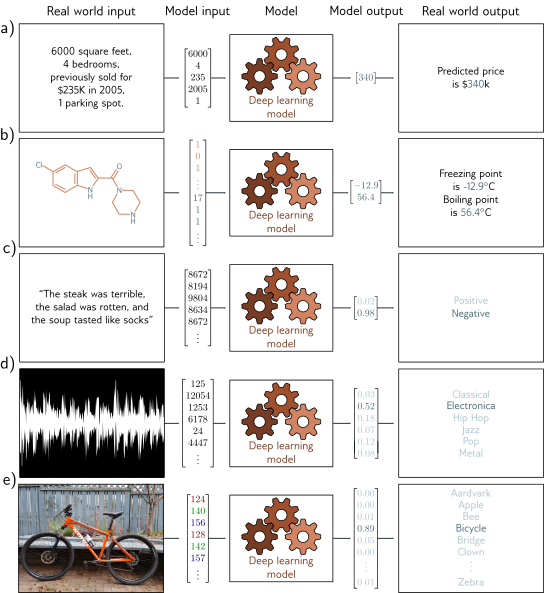
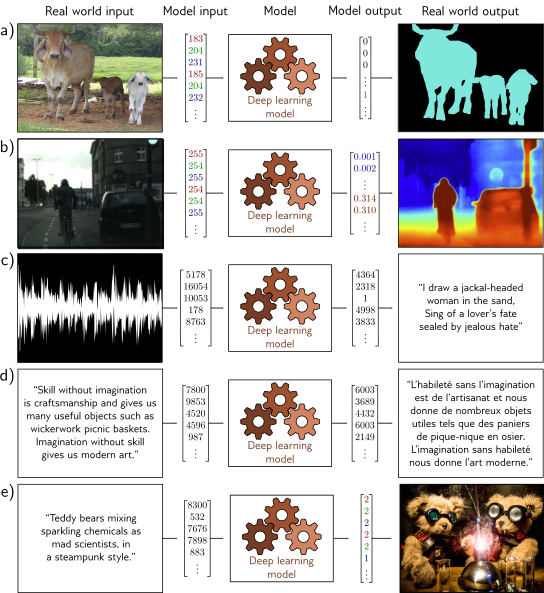
Recall linear regression predicts a continuous output:
\[ \hat{y} = \beta_0 + \beta_1 x_1 + \beta_2 x_2 + \cdots + \beta_p x_p = \mathbf{x}^T\boldsymbol{\beta} \]
Or in matrix form for multiple samples:
\[ \hat{\mathbf{y}} = \mathbf{X}\boldsymbol{\beta} \]
Adds Non-linearity
For binary classification, logistic regression applies a sigmoid function:
\[ P(y=1|\mathbf{x}) = \sigma(\mathbf{x}^T\boldsymbol{\beta}) = \frac{1}{1 + e^{-\mathbf{x}^T\boldsymbol{\beta}}} \]
The sigmoid function introduces non-linearity:
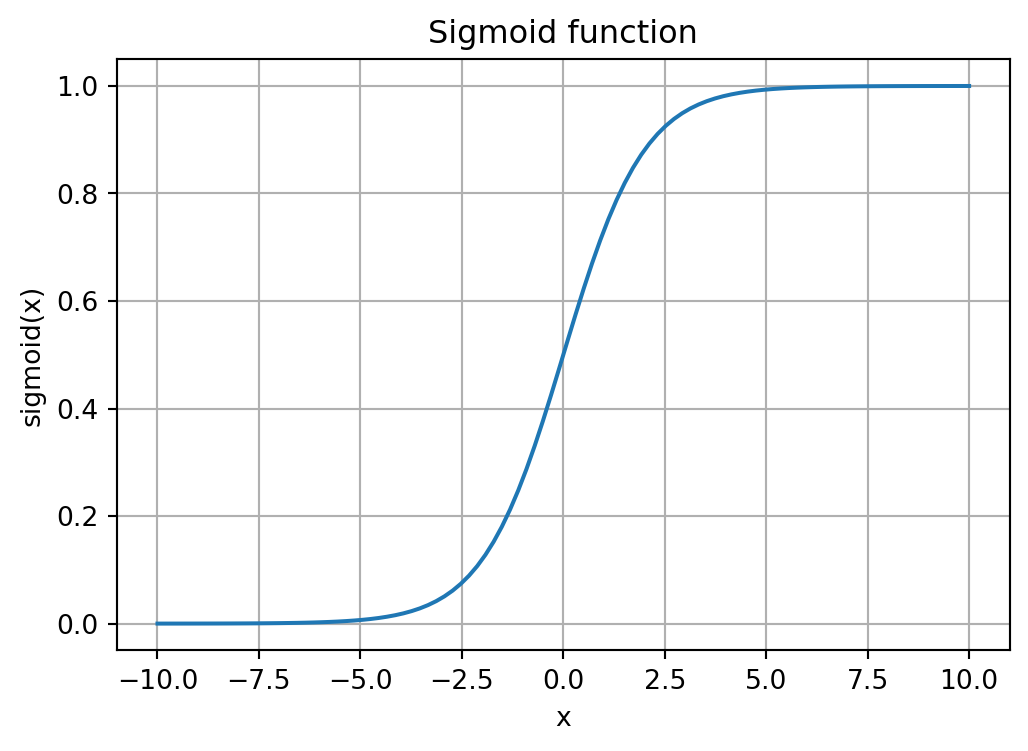
A single neuron with a sigmoid activation is essentially logistic regression!
Neural networks extend this by:
This allows neural networks to learn complex, non-linear decision boundaries.
An artificial neuron is loosely modeled on biological neurons:
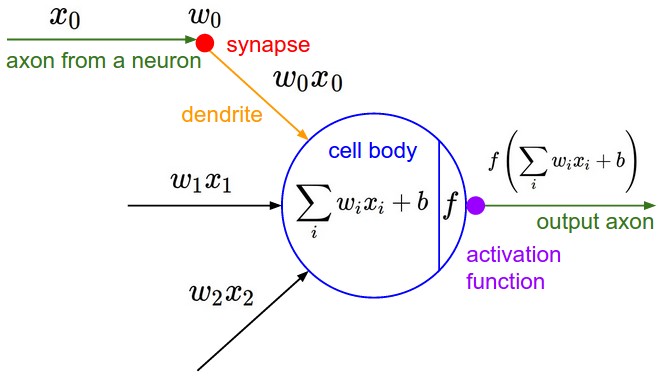
From cs231n
A neuron performs the following operation:
\[ \text{output} = f\left(\sum_{i=1}^n w_i x_i + b\right) \]
Where:
ReLU (Rectified Linear Unit) - most popular today: \[ \text{ReLU}(x) = \max(0, x) \]
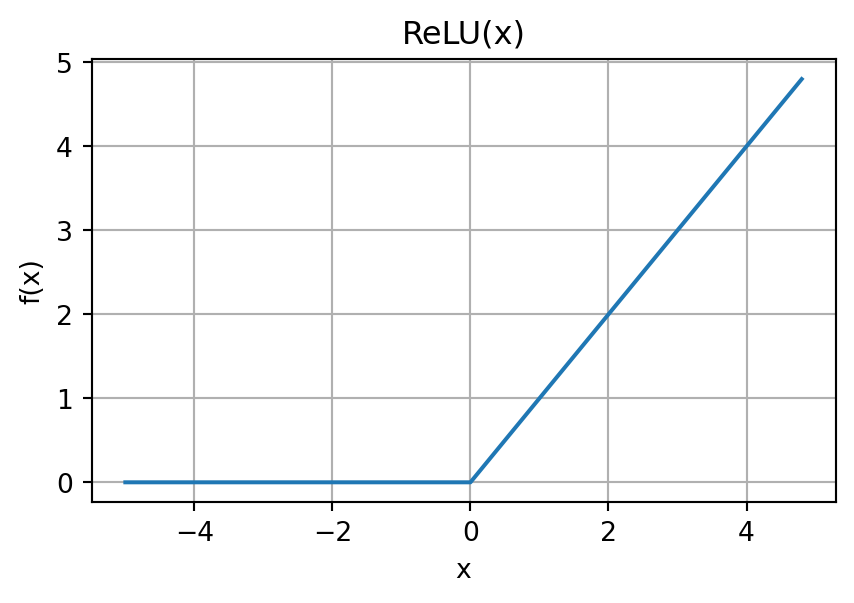
Answer: Without non-linearity, multiple layers collapse to a single linear transformation!
A Multi-Layer Perceptron stacks multiple layers of neurons:
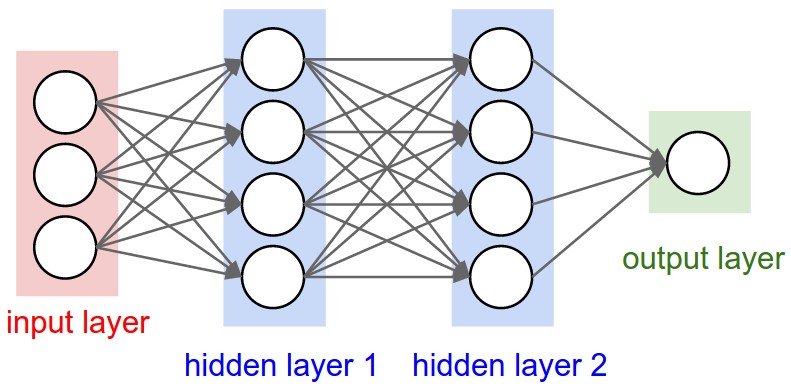
From cs231n
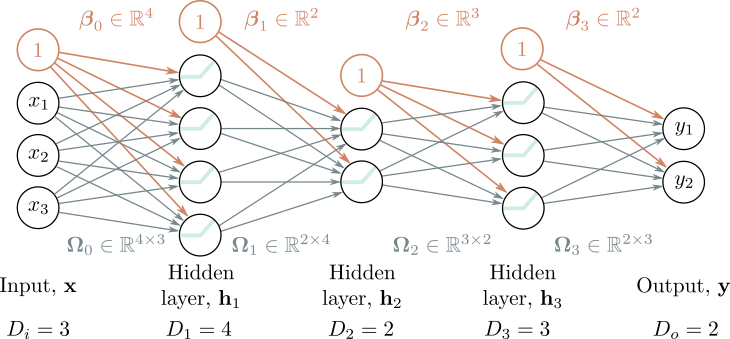
Key property: Every neuron in layer \(i\) connects to every neuron in layer \(i+1\).
This is also called a Fully Connected Network (FCN) or Dense Network.
For a network with \(K\) hidden layers:
\[ \begin{aligned} \mathbf{h}_1 &= f(\boldsymbol{\beta}_0 + \boldsymbol{\Omega}_0 \mathbf{x}) \\ \mathbf{h}_2 &= f(\boldsymbol{\beta}_1 + \boldsymbol{\Omega}_1 \mathbf{h}_1) \\ &\vdots \\ \mathbf{h}_K &= f(\boldsymbol{\beta}_{K-1} + \boldsymbol{\Omega}_{K-1} \mathbf{h}_{K-1}) \\ \mathbf{\hat{y}} &= \boldsymbol{\beta}_K + \boldsymbol{\Omega}_K \mathbf{h}_K \end{aligned} \]
Where:
Training means finding weights that minimize a loss function:
For regression (e.g., predicting house prices): \[ L = \frac{1}{N}\sum_{i=1}^N (\hat{y}_i - y_i)^2 \quad \text{(Mean Squared Error)} \]
For classification (e.g., digit recognition): \[ L = -\frac{1}{N}\sum_{i=1}^N \sum_{c=1}^C y_{ic} \log(\hat{y}_{ic}) \quad \text{(Cross-Entropy)} \]
Goal: Find parameters \(\theta = \{\boldsymbol{\Omega}_k, \boldsymbol{\beta}_k\}\) that minimize \(L\).
The loss function creates a surface over the parameter space:
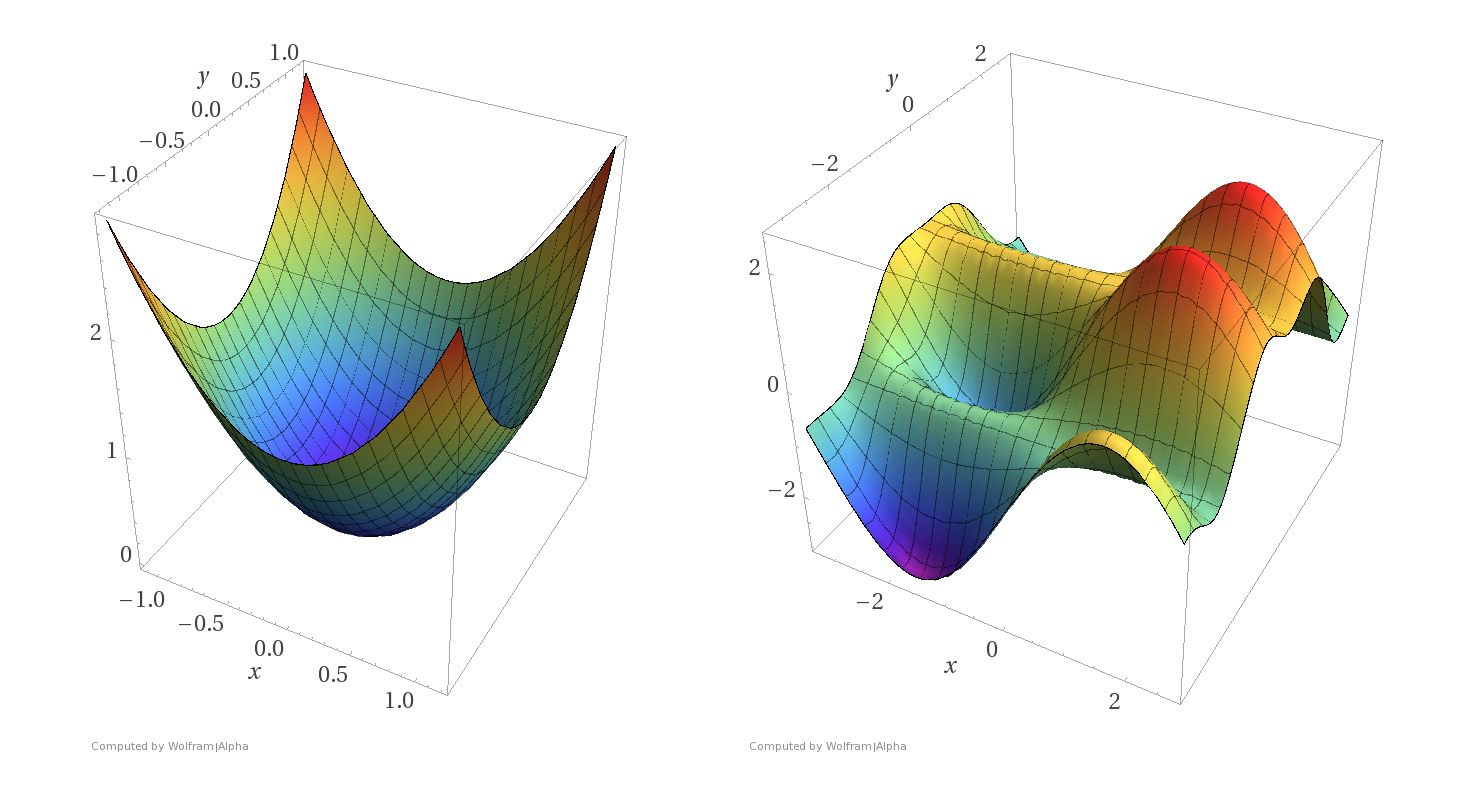
For neural networks, we can’t solve analytically—we need gradient descent!
Imagine you’re lost in foggy mountains and want to reach the valley:

What would you do?
This is gradient descent!
For a function \(L(\mathbf{w})\) where \(\mathbf{w} = (w_1, \ldots, w_n)\), the gradient is:
\[ \nabla_\mathbf{w} L(\mathbf{w}) = \begin{bmatrix} \frac{\partial L}{\partial w_1}\\ \frac{\partial L}{\partial w_2}\\ \vdots \\ \frac{\partial L}{\partial w_n} \end{bmatrix} \]
Start with random weights \(\mathbf{w}^{(0)}\), then iterate:
\[ \mathbf{w}^{(t+1)} = \mathbf{w}^{(t)} - \eta \nabla_\mathbf{w} L(\mathbf{w}^{(t)}) \]
Where:
Stop when:
The learning rate \(\eta\) is crucial:
Too small: Slow convergence
Too large: May fail to converge or even diverge!
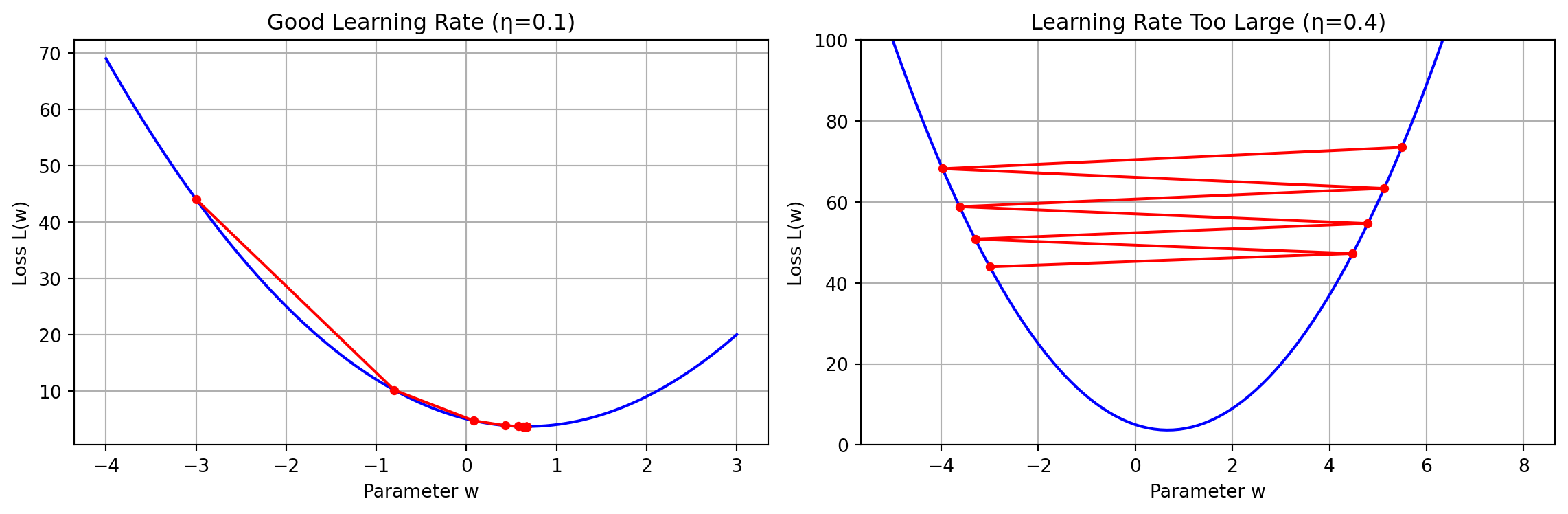
Full Batch Gradient Descent: Compute gradient using ALL training samples:
\[ \nabla_\mathbf{w} L = \frac{1}{N}\sum_{i=1}^N \nabla_\mathbf{w} \ell_i(\mathbf{w}) \]
Problems:
Stochastic Gradient Descent: Historically meant using ONE random sample at a time:
\[ \mathbf{w}^{(t+1)} = \mathbf{w}^{(t)} - \eta \nabla_\mathbf{w} \ell_i(\mathbf{w}^{(t)}) \]
Advantages:
Disadvantage:
Mini-Batch GD: Best of both worlds—use a small batch of samples:
\[ \nabla_\mathbf{w} L \approx \frac{1}{B}\sum_{i \in \text{batch}} \nabla_\mathbf{w} \ell_i(\mathbf{w}) \]
Typical batch sizes: 32, 64, 128, 256
Advantages:
This is what most modern neural network training uses!
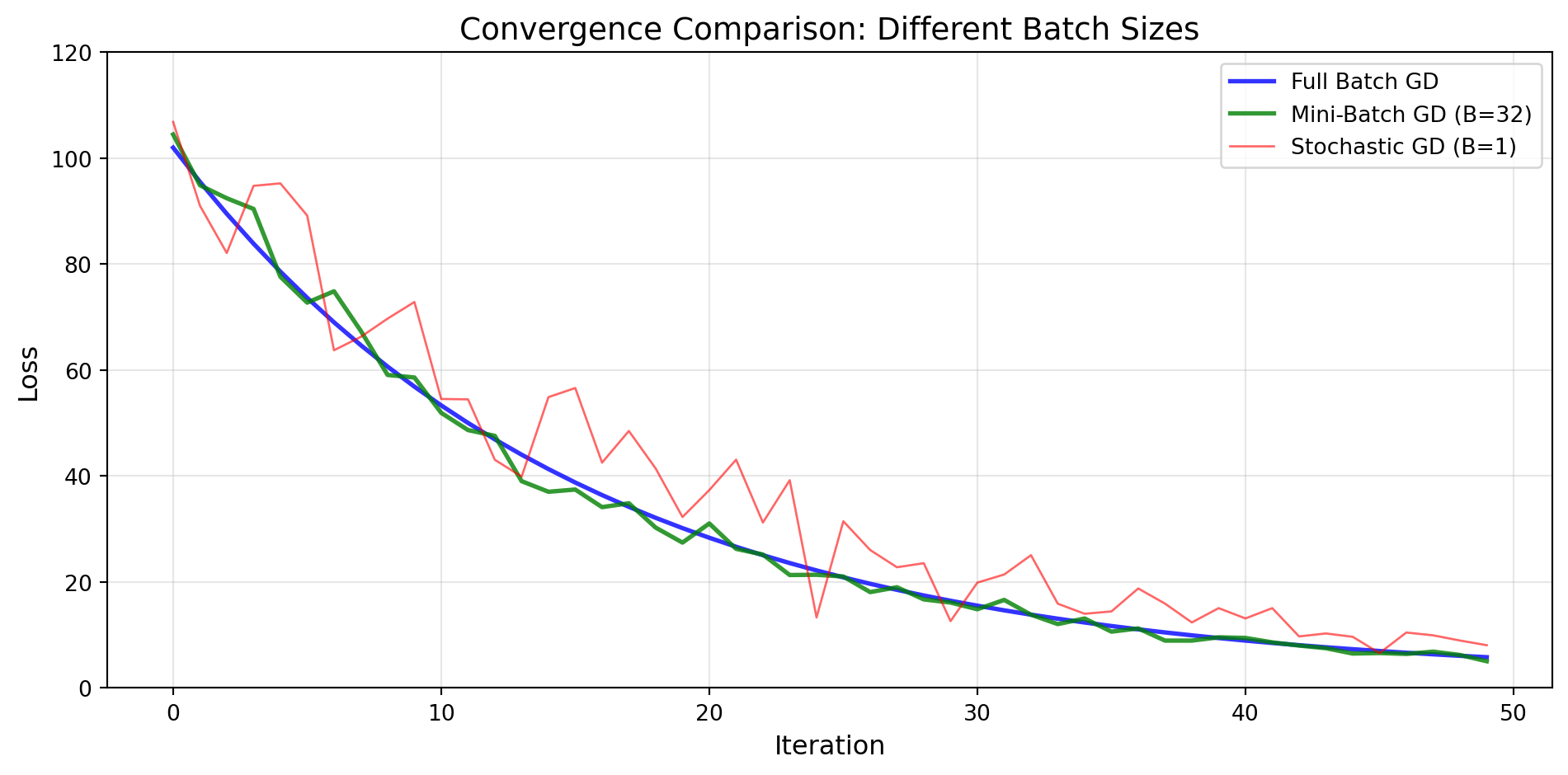
(For illustration purposes only – not a real training curve.)
Scikit-learn provides simple, high-level interfaces:
MLPClassifier: Multi-layer Perceptron classifierMLPRegressor: Multi-layer Perceptron regressorKey features:
'adam', 'sgd', 'lbfgs'Specify architecture as a tuple:
# Single hidden layer with 100 neurons
hidden_layer_sizes=(100,)

# Two hidden layers: 100 and 50 neurons
hidden_layer_sizes=(100, 50)

# Three hidden layers
hidden_layer_sizes=(128, 64, 32)
Input and output layers are automatically determined from your data!
Let’s classify handwritten digits (0-9):
from sklearn.datasets import fetch_openml
from sklearn.model_selection import train_test_split

# Load MNIST data
print("Loading MNIST dataset...")
X, y = fetch_openml('mnist_784', version=1, return_X_y=True,
                    as_frame=False, parser='auto')

# Convert labels to integers
y = y.astype(int)

# Use subset for faster demo
X, _, y, _ = train_test_split(X, y, train_size=10000,
                               stratify=y, random_state=42)

print(f"Dataset shape: {X.shape}")
print(f"Number of classes: {len(np.unique(y))}")
Loading MNIST dataset...
Dataset shape: (10000, 784)
Number of classes: 10fig, axes = plt.subplots(2, 5, figsize=(12, 4))
for i, ax in enumerate(axes.flat):
ax.imshow(X[i].reshape(28, 28), cmap='gray')
ax.set_title(f'Label: {y[i]}')
ax.axis('off')
plt.tight_layout()
plt.show()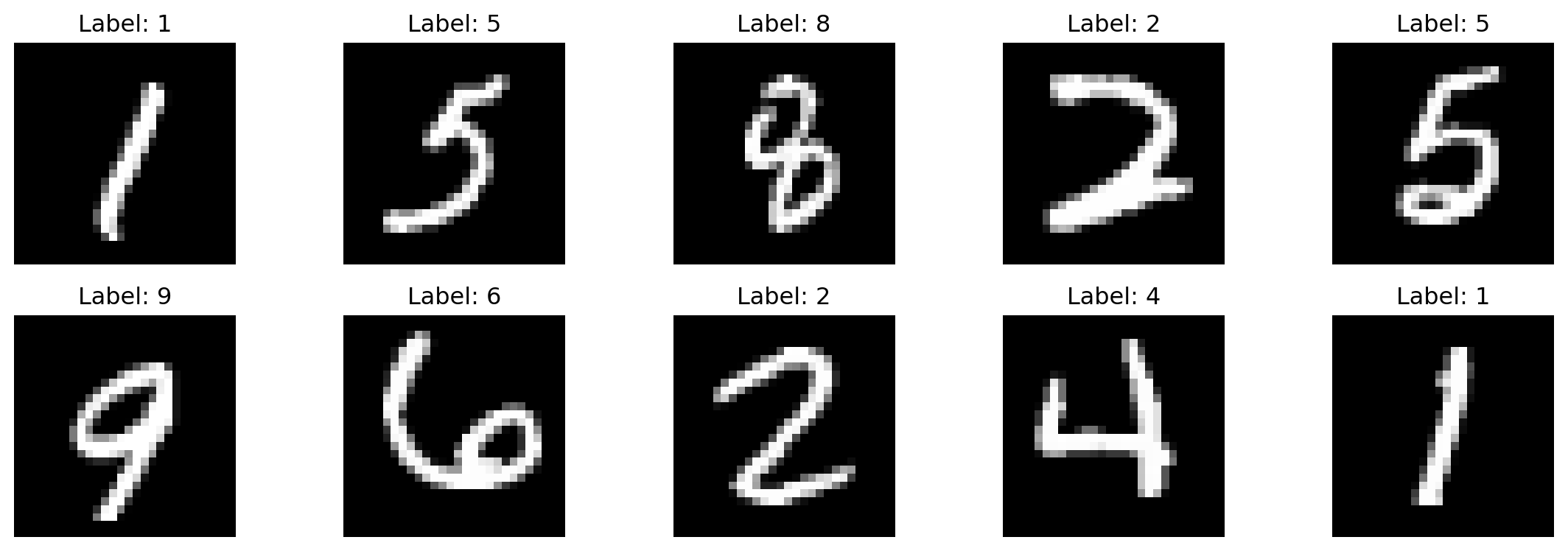
Each image is 28×28 pixels = 784 features
# Split into training and test sets
X_train, X_test, y_train, y_test = train_test_split(
    X, y, test_size=0.2, random_state=42
)

# Scale features to [0, 1]
X_train_scaled = X_train / 255.0
X_test_scaled = X_test / 255.0

print(f"Training set: {X_train.shape[0]} samples")
print(f"Test set: {X_test.shape[0]} samples")
print(f"Feature range: [{X_train_scaled.min():.2f}, {X_train_scaled.max():.2f}]")
Training set: 8000 samples
Test set: 2000 samples
Feature range: [0.00, 1.00]Always scale/normalize your features for neural networks! This helps gradient descent converge faster.
from sklearn.neural_network import MLPClassifier

# Create MLP with 2 hidden layers
mlp = MLPClassifier(
    hidden_layer_sizes=(128, 64),  # Architecture
    activation='relu',              # Activation function
    solver='adam',                  # Optimizer (uses mini-batches)
    alpha=0.0001,                   # L2 regularization
    batch_size=64,                  # Mini-batch size
    learning_rate_init=0.001,       # Initial learning rate
    max_iter=20,                    # Number of epochs
    random_state=42,
    verbose=True                    # Show progress
)print("Training MLP...")
mlp.fit(X_train_scaled, y_train)
print(f"Training completed in {mlp.n_iter_} iterations")Training MLP...
Iteration 1, loss = 0.71345206
Iteration 2, loss = 0.26439384
Iteration 3, loss = 0.18880844
Iteration 4, loss = 0.14070827
Iteration 5, loss = 0.10813206
Iteration 6, loss = 0.08241134
Iteration 7, loss = 0.06312883
Iteration 8, loss = 0.04742022
Iteration 9, loss = 0.03751731
Iteration 10, loss = 0.02680532
Iteration 11, loss = 0.02321482
Iteration 12, loss = 0.01516949
Iteration 13, loss = 0.01235069
Iteration 14, loss = 0.00823132
Iteration 15, loss = 0.00665425
Iteration 16, loss = 0.00515634
Iteration 17, loss = 0.00431783
Iteration 18, loss = 0.00336489
Iteration 19, loss = 0.00283319
Iteration 20, loss = 0.00253876
Training completed in 20 iterationsplt.figure(figsize=(10, 4))
plt.plot(mlp.loss_curve_)
plt.xlabel('Iteration (Epoch)')
plt.ylabel('Loss')
plt.title('Training Loss Curve')
plt.grid(True)
plt.show()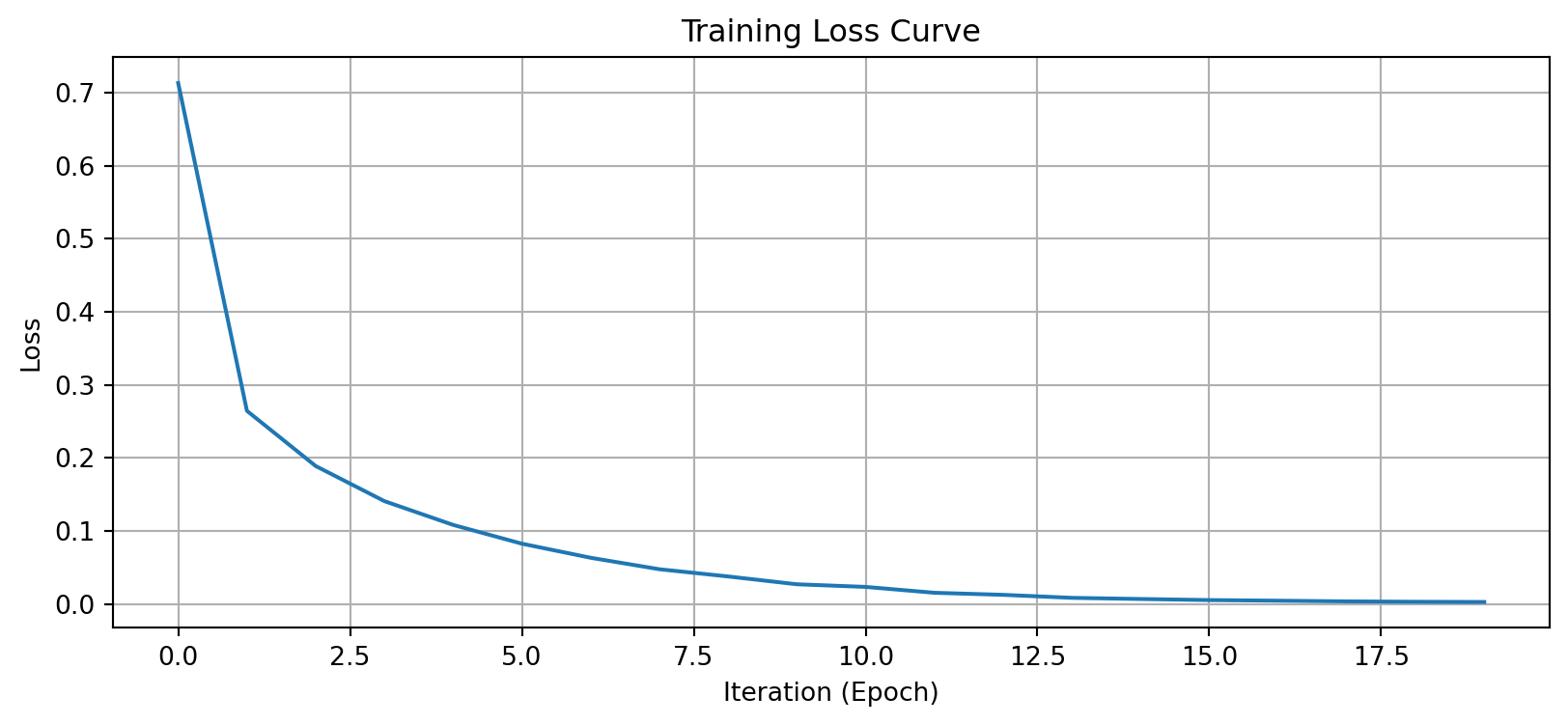
The loss decreases smoothly—our model is learning.
from sklearn.metrics import accuracy_score, classification_report

# Make predictions
y_pred = mlp.predict(X_test_scaled)

# Calculate accuracy
accuracy = accuracy_score(y_test, y_pred)
print(f"Test Accuracy: {accuracy:.4f}")

# Detailed report
print("\nClassification Report:")
print(classification_report(y_test, y_pred))
Test Accuracy: 0.9555
Classification Report:
precision recall f1-score support
0 0.95 0.99 0.97 191
1 0.98 1.00 0.99 226
2 0.94 0.96 0.95 215
3 0.95 0.93 0.94 202
4 0.98 0.94 0.96 206
5 0.96 0.94 0.95 168
6 0.98 0.97 0.98 196
7 0.93 0.96 0.95 185
8 0.96 0.95 0.95 206
9 0.91 0.91 0.91 205
accuracy 0.96 2000
macro avg 0.96 0.96 0.96 2000
weighted avg 0.96 0.96 0.96 2000
from sklearn.metrics import confusion_matrix, ConfusionMatrixDisplay

fig, ax = plt.subplots(figsize=(8, 6))
cm = confusion_matrix(y_test, y_pred)
disp = ConfusionMatrixDisplay(confusion_matrix=cm, display_labels=mlp.classes_)
disp.plot(ax=ax, cmap='Blues', values_format='d')
plt.title('Confusion Matrix for MNIST Classification')
plt.show()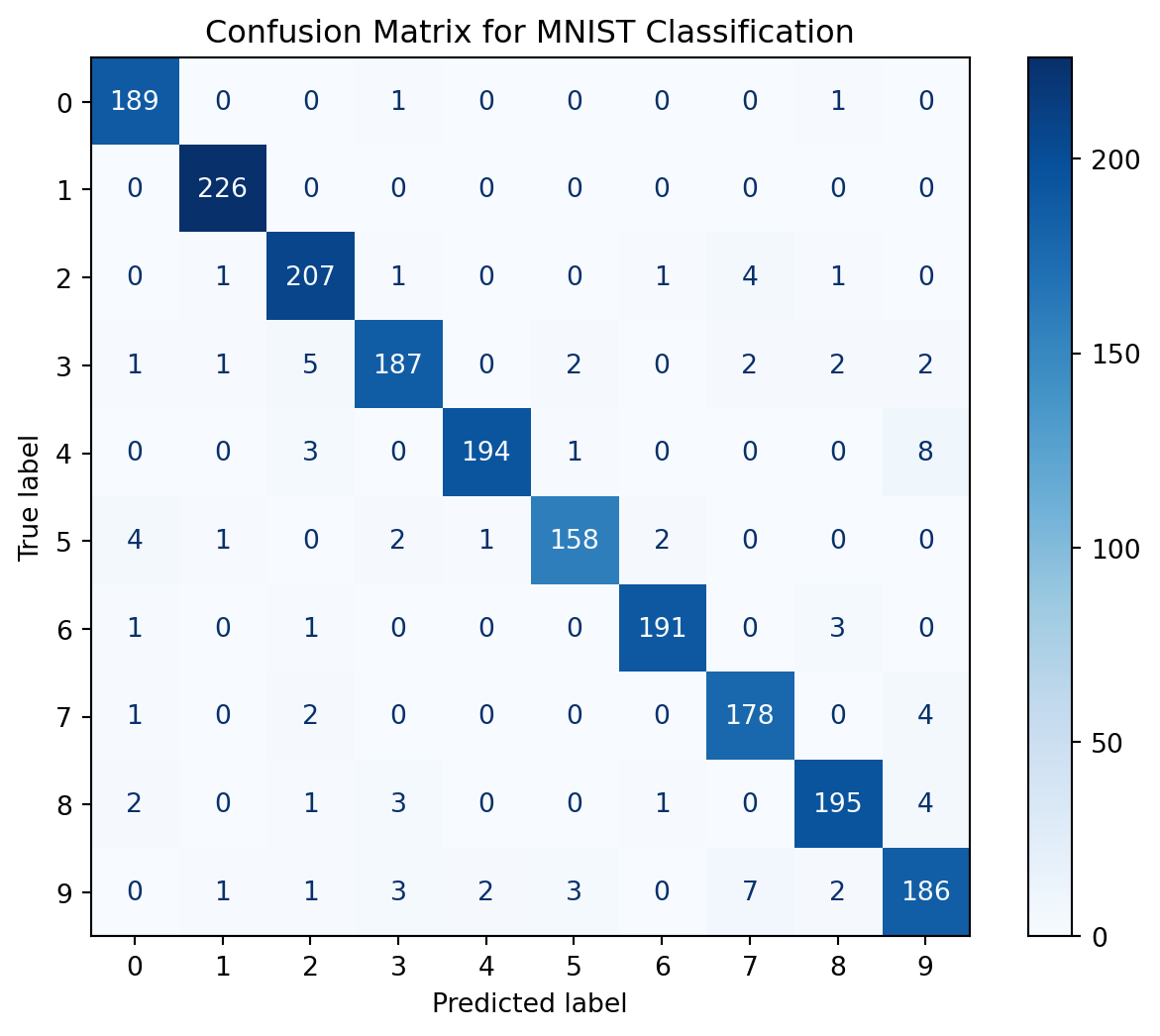
# Get prediction probabilities
y_pred_proba = mlp.predict_proba(X_test_scaled)

fig, axes = plt.subplots(2, 5, figsize=(12, 5))
for i, ax in enumerate(axes.flat):
    ax.imshow(X_test[i].reshape(28, 28), cmap='gray')
    pred_label = y_pred[i]
    true_label = y_test[i]
    confidence = y_pred_proba[i].max()

    color = 'green' if pred_label == true_label else 'red'
    ax.set_title(f'True: {true_label}, Pred: {pred_label}\nConf: {confidence:.2f}',
                 color=color)
    ax.axis('off')
plt.tight_layout()
plt.show()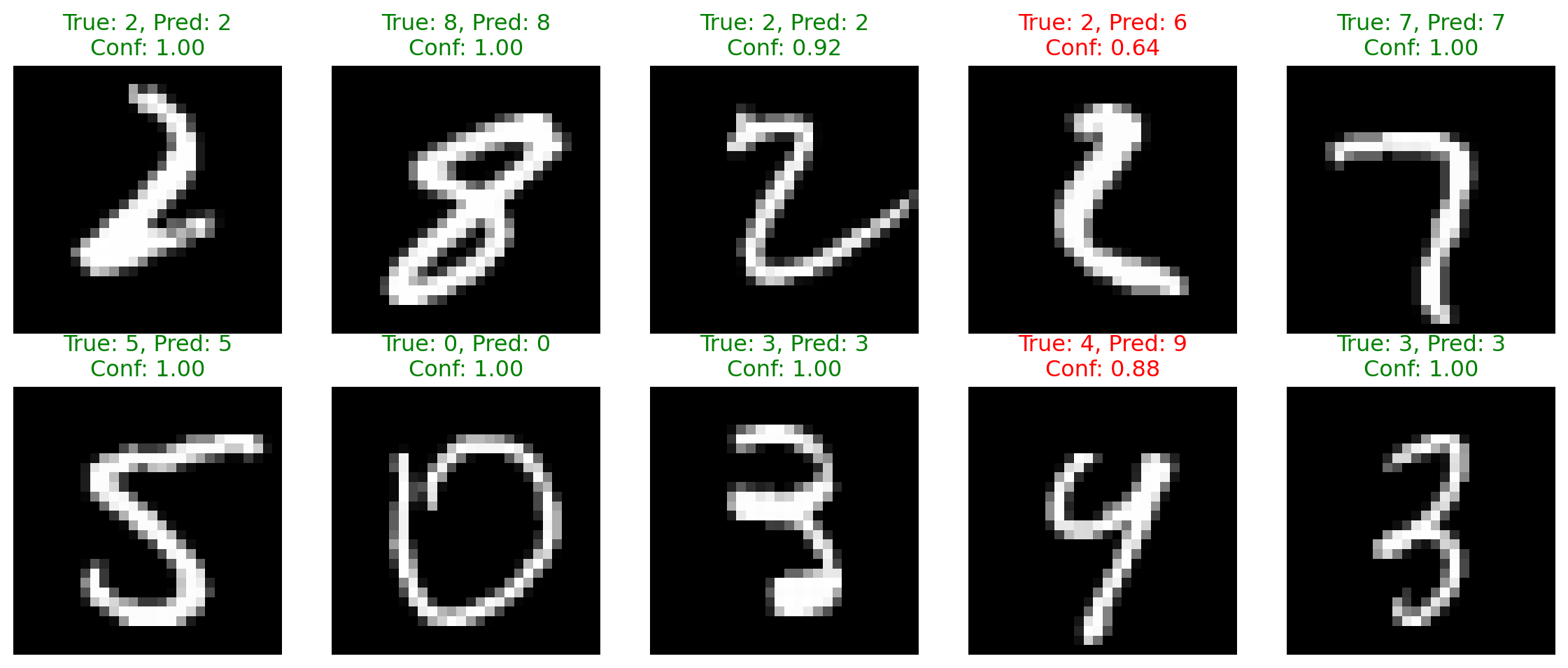
Let’s predict house prices using MLP regression:
from sklearn.datasets import fetch_california_housing
from sklearn.preprocessing import StandardScaler
from sklearn.neural_network import MLPRegressor

# Load housing data
housing = fetch_california_housing()
X_housing = housing.data
y_housing = housing.target

print(f"Dataset shape: {X_housing.shape}")
print(f"Features: {housing.feature_names}")
Dataset shape: (20640, 8)
Features: ['MedInc', 'HouseAge', 'AveRooms', 'AveBedrms', 'Population', 'AveOccup', 'Latitude', 'Longitude']Target: Median house value (in $100,000s)
# Split and scale
X_train_h, X_test_h, y_train_h, y_test_h = train_test_split(
    X_housing, y_housing, test_size=0.2, random_state=42
)

scaler = StandardScaler()
X_train_h_scaled = scaler.fit_transform(X_train_h)
X_test_h_scaled = scaler.transform(X_test_h)

# Train MLP Regressor with early stopping
mlp_reg = MLPRegressor(
    hidden_layer_sizes=(100, 50),
    activation='relu',
    solver='adam',
    alpha=0.001,
    batch_size=32,
    max_iter=100,
    early_stopping=True,
    validation_fraction=0.1,
    n_iter_no_change=10,
    random_state=42,
    verbose=False
)print("Training MLP Regressor...")
mlp_reg.fit(X_train_h_scaled, y_train_h)
print(f"Training stopped at iteration: {mlp_reg.n_iter_}")Training MLP Regressor...
Training stopped at iteration: 76plt.figure(figsize=(10, 4))
plt.plot(mlp_reg.loss_curve_)
plt.xlabel('Iteration (Epoch)')
plt.ylabel('Loss')
plt.title('Training Loss Curve')
plt.grid(True)
plt.show()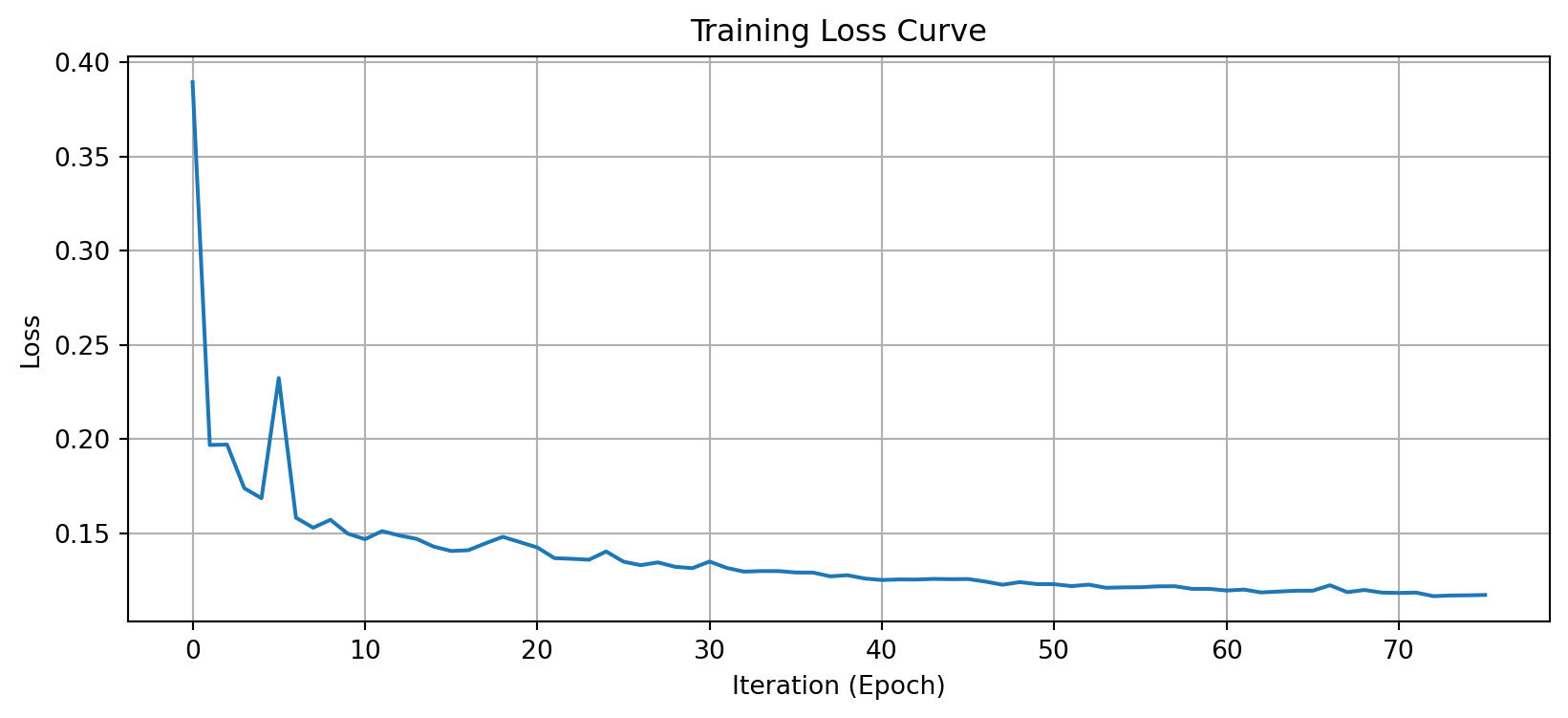
from sklearn.metrics import mean_squared_error, r2_score, mean_absolute_error

# Make predictions
y_pred_h = mlp_reg.predict(X_test_h_scaled)

# Calculate metrics
mse = mean_squared_error(y_test_h, y_pred_h)
rmse = np.sqrt(mse)
mae = mean_absolute_error(y_test_h, y_pred_h)
r2 = r2_score(y_test_h, y_pred_h)

print(f"Root Mean Squared Error: {rmse:.4f}")
print(f"Mean Absolute Error: {mae:.4f}")
print(f"R² Score: {r2:.4f}")
Root Mean Squared Error: 0.5138
Mean Absolute Error: 0.3460
R² Score: 0.7986An \(R^2\) of ~0.8 means our model explains 80% of the variance in house prices!
fig, axes = plt.subplots(1, 2, figsize=(10, 5))

# Scatter plot
axes[0].scatter(y_test_h, y_pred_h, alpha=0.5)
axes[0].plot([y_test_h.min(), y_test_h.max()],
             [y_test_h.min(), y_test_h.max()], 'r--', lw=2)
axes[0].set_xlabel('Actual Values')
axes[0].set_ylabel('Predicted Values')
axes[0].set_title('Predicted vs Actual House Prices')
axes[0].grid(True)

# Residual plot
residuals = y_test_h - y_pred_h
axes[1].scatter(y_pred_h, residuals, alpha=0.5)
axes[1].axhline(y=0, color='r', linestyle='--', lw=2)
axes[1].set_xlabel('Predicted Values')
axes[1].set_ylabel('Residuals')
axes[1].set_title('Residual Plot')
axes[1].grid(True)

plt.tight_layout()
plt.show()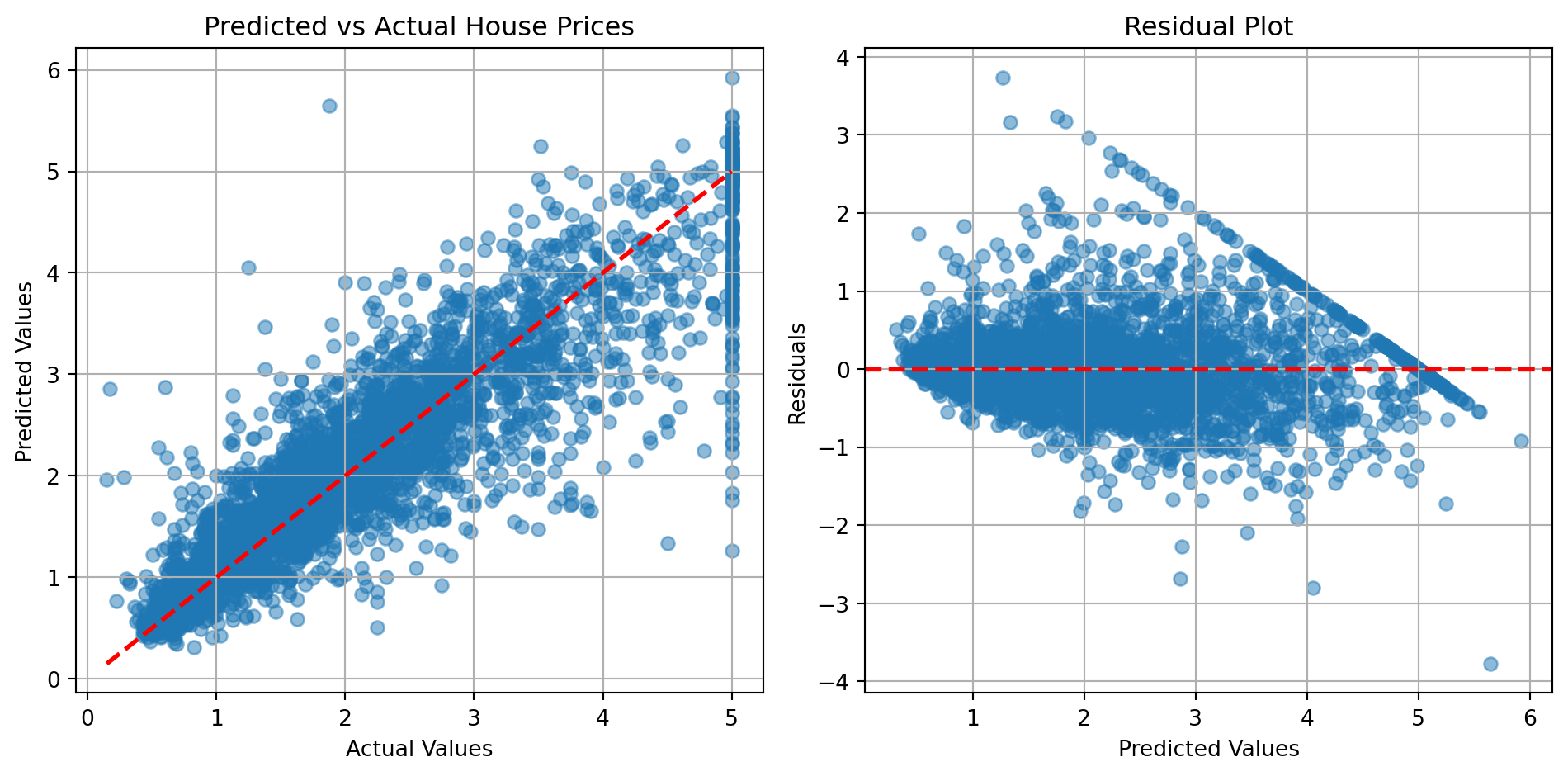
scikit-learn provides GridSearchCV for hyperparameter tuning:
Create a model without certain hyperparameters.
# Create MLP
mlp_grid = MLPClassifier(
    max_iter=20,
    random_state=42,
    early_stopping=True,
    validation_fraction=0.1,
    n_iter_no_change=5,
    verbose=False
)

# Use subset for faster demo
X_grid = X_train_scaled[:1500]
y_grid = y_train[:1500]Define the parameter grid and run the grid search.
from sklearn.model_selection import GridSearchCV

# Define parameter grid
param_grid = {
    'hidden_layer_sizes': [(50,), (100,), (50, 50)],
    'activation': ['relu'],
    'alpha': [0.0001, 0.001]
}

print("Running Grid Search...")
grid_search = GridSearchCV(mlp_grid, param_grid, cv=3, n_jobs=2, verbose=0)
grid_search.fit(X_grid, y_grid)

print(f"\nBest parameters: {grid_search.best_params_}")
print(f"Best CV score: {grid_search.best_score_:.4f}")
Running Grid Search...
Best parameters: {'activation': 'relu', 'alpha': 0.001, 'hidden_layer_sizes': (50,)}
Best CV score: 0.8740results_df = pd.DataFrame(grid_search.cv_results_)
n_configs = min(10, len(results_df))
top_results = results_df.nlargest(n_configs, 'mean_test_score')
# plt.figure(figsize=(10, 5))
# plt.barh(range(len(top_results)), top_results['mean_test_score'])
# plt.yticks(range(len(top_results)),
# [f"Config {i+1}" for i in range(len(top_results))])
# plt.xlabel('Mean CV Score')
# plt.title('Top Hyperparameter Configurations')
# plt.grid(True, axis='x')
# plt.tight_layout()
# plt.show()
print("\nTop configurations:")
for idx, row in top_results.iterrows():
print(f"\nConfiguration {idx + 1}:")
for key, value in row['params'].items():
print(f" {key}: {value}")
print("\nMean CV Score:")
print(top_results[['mean_test_score', 'std_test_score']].head())
Top configurations:

Configuration 4:
  activation: relu
  alpha: 0.001
  hidden_layer_sizes: (50,)

Configuration 1:
  activation: relu
  alpha: 0.0001
  hidden_layer_sizes: (50,)

Configuration 2:
  activation: relu
  alpha: 0.0001
  hidden_layer_sizes: (100,)

Configuration 5:
  activation: relu
  alpha: 0.001
  hidden_layer_sizes: (100,)

Configuration 6:
  activation: relu
  alpha: 0.001
  hidden_layer_sizes: (50, 50)

Configuration 3:
  activation: relu
  alpha: 0.0001
  hidden_layer_sizes: (50, 50)

Mean CV Score:
   mean_test_score  std_test_score
3         0.874000        0.007483
0         0.872000        0.008165
1         0.870667        0.016357
4         0.869333        0.015861
5 0.869333 0.010625StandardScaler or normalize to [0, 1]from sklearn.pipeline import Pipeline
pipeline = Pipeline([
('scaler', StandardScaler()),
('mlp', MLPClassifier(hidden_layer_sizes=(100,)))
])
pipeline.fit(X_train, y_train)(100,) or (50, 50)(100, 50) or (128, 64, 32)Three key techniques:
1. Regularization: Add L2 penalty (alpha parameter)
mlp = MLPClassifier(alpha=0.01) # Stronger regularization2. Early Stopping: Stop when validation performance plateaus
mlp = MLPClassifier(early_stopping=True,
                    validation_fraction=0.2,
                    n_iter_no_change=10)
3. Cross-Validation: Get robust performance estimates
from sklearn.model_selection import cross_val_score
scores = cross_val_score(mlp, X_train, y_train, cv=5)Different solvers for different scenarios:
| Solver | Best For | Notes |
|---|---|---|
'adam' |
Most cases | Good default, adaptive learning rate |
'sgd' |
Large datasets | Classic mini-batch SGD |
'lbfgs' |
Small datasets | Faster for small data, more memory |
# Compare solvers
solvers = ['adam', 'sgd', 'lbfgs']
results = {}

for solver in solvers:
    mlp = MLPClassifier(
        hidden_layer_sizes=(50,),
        solver=solver,
        max_iter=50,
        random_state=42,
        verbose=False
    )
    mlp.fit(X_train_scaled[:2000], y_train[:2000])
    score = mlp.score(X_test_scaled, y_test)
    results[solver] = score
    print(f"{solver:10s}: {score:.4f}")
adam : 0.9000
sgd : 0.8330
lbfgs : 0.8800If you see ConvergenceWarning:
max_iterlearning_rate_initearly_stopping=TrueIf accuracy is low:
Theory:
Practice:
MLPClassifier and MLPRegressor for easy implementationOther modules in the course notes:
Additional resources: